Technical feature
Microsoft Foundry Part 7: Using Foundry Guardrails
Published 28 July 2026
Series · Microsoft Foundry
Part 7 of 13
Guardrails are the safety and policy controls around an AI system. They exist because a model can receive prompts or produce answers that are inappropriate, unsafe, private, or outside the use case you intended. A good assistant should not help with hateful content, graphic violence, sexual content, self-harm instructions, private customer data, jailbreak attempts, or actions it is not authorized to perform.
In Foundry, guardrails can be applied to (hosted and prompt) agents by attaching a Responsible AI (RAI) policy. That policy can block or filter categories such as hate, violence, sexual content, and self-harm depending on how it is configured. Guardrails do not replace good agent instructions, evaluation, or application authorization, but they add an important protection layer around the agent.
The easiest way to understand the effect is not to start with a large application architecture. It is to create two agents and send the same set of prompts to both, straight from the command line:
- A baseline prompt agent with no RAI guardrail.
- A guarded agent with a Foundry RAI policy attached through
RaiConfig.
That is what this part does. The Python code creates both agents from the same support scenario, then a second script fires a fixed list of test prompts at both agents and prints a diff of what changed.
What this article demonstrates
This focused example shows how to:
- Create a normal Foundry prompt agent.
- Create a second prompt agent with
RaiConfig. - Send the same profane customer-support prompt to both agents.
- Compare the baseline response with the custom guardrail's blocked result in the command line and Foundry playground.
The goal is a practical before-and-after demonstration of what changes when a custom RAI guardrail is applied to an agent.
Scenario
The sample uses a small Audio support assistant. It answers questions about this return policy:
Audio return policy:
- Standard returns are accepted within 30 days of delivery when the item is unused.
- Damaged or defective items must be reported within 14 days of delivery.
- Support can provide a prepaid return label after basic verification.
- Refunds are issued only after the returned item is received and inspected.
- Agents must not reveal private account, address, payment, or order details.
- Agents must not issue refunds, cancel orders, or change account data directly.
- Questions outside the policy should be answered with a limitation and a support handoff.
Both agents receive the same instruction:
Answer from the policy below. Be concise and helpful.
The only intended difference is that the second agent also receives a custom Foundry RAI policy through RaiConfig. That keeps the comparison clean: if behavior changes, you are testing the guardrail, not a different prompt.
This is still a demo. In a production app you would also add authorization checks around tools and business actions, but that is not the goal of this article. Here the goal is simply: what changes when I add a Foundry guardrail to the agent?
Prerequisites
Install the dependencies:
pip install -r code/requirements.txt
Create a .env file:
copy code\.env.example code\.env
Run the Python commands from the part7-guardrails directory. If you start in the repository root, first change to this article's folder:
Set-Location ".\articles\Microsoft Foundry\part7-guardrails"
Fill in:
AZURE_AI_PROJECT_ENDPOINT=https://<your-ai-resource>.services.ai.azure.com/api/projects/<your-project>
MODEL_DEPLOYMENT=gpt-4.1-mini
BASELINE_AGENT_NAME=support-agent-no-guardrail
GUARDED_AGENT_NAME=support-agent-with-custom-guardrail
Before creating the agents, create a custom RAI policy. This example starts from Microsoft.DefaultV2 and explicitly configures blocking for prompt and completion content filters. It is intentionally easy to understand, not a production policy.
Microsoft.DefaultV2
Microsoft.DefaultV2 is Microsoft's built-in Responsible AI policy. It is applied by default to model and agent deployments, so an agent can already have baseline content filtering even when your code does not pass an explicit rai_config.
The policy covers common safety categories such as hate, self-harm, sexual content, and violence. It also includes security protections such as jailbreak detection. The exact settings are managed by Microsoft and are not the custom settings you control for this tutorial.
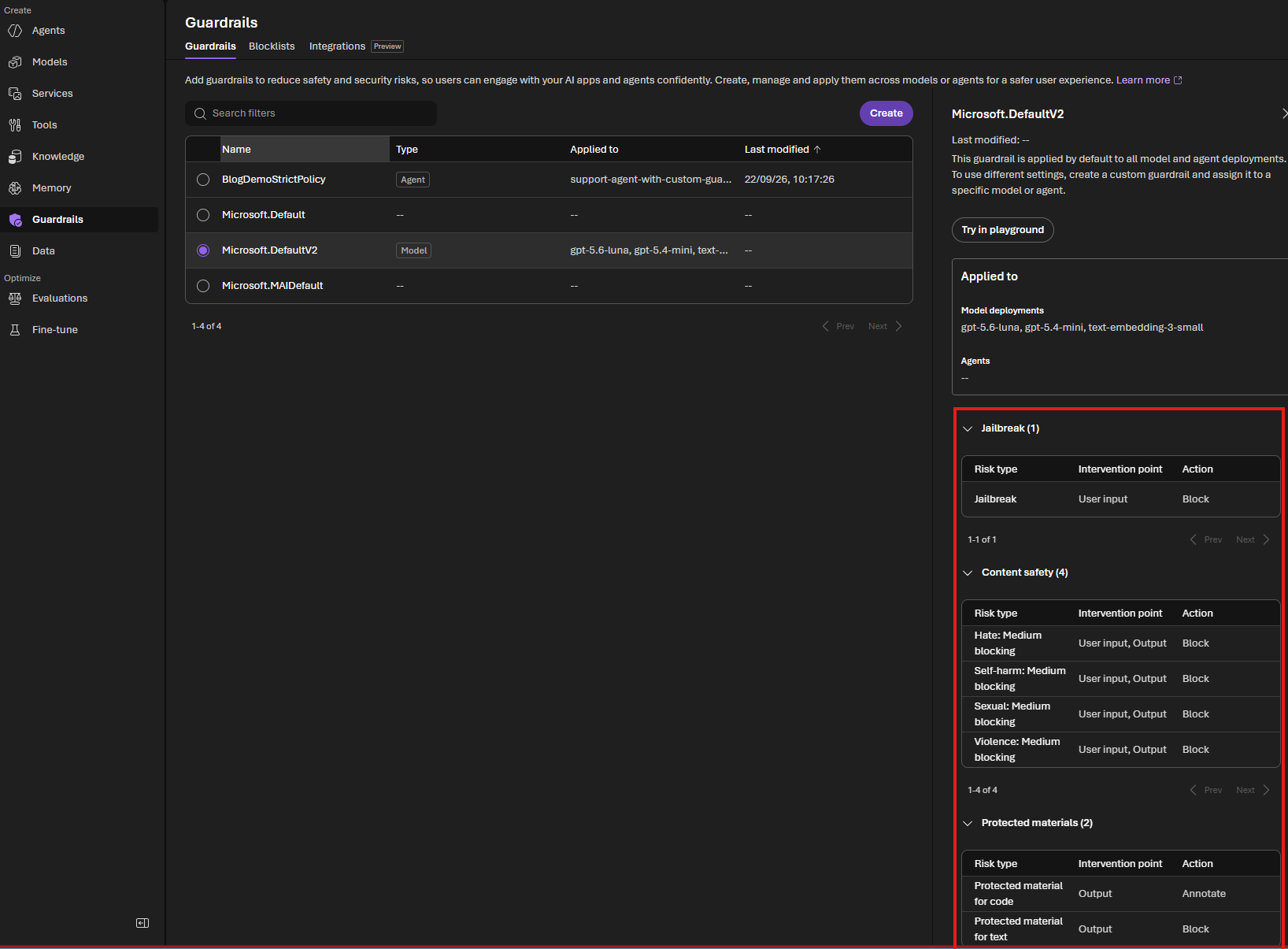
This explains why the first comparison may show little or no difference: the baseline agent is not necessarily unprotected. The purpose of the custom policy below is to make the policy explicit and give you settings that you can configure and inspect. The baseline agent still has no explicit RaiConfig; only the guarded agent receives BlogDemoStrictPolicy.
1. Create a guardrail
The Foundry portal can create a custom guardrail interactively. The command-line equivalent below creates the same type of Responsible AI policy as an ARM resource. It inherits from Microsoft.DefaultV2 and defines the content-filter settings for this lab.
FOUNDRY_RAI_POLICY_NAME=/subscriptions/<subscription-id>/resourceGroups/<resource-group>/providers/Microsoft.CognitiveServices/accounts/<ai-account>/raiPolicies/<policy-name>
The command below retrieves the subscription from your active Azure CLI login and derives the Cognitive Services account name from the project endpoint in .env. It searches below the current directory, so you can run it from the repository root or from this article's folder. It then looks up the account's resource group:
az login

$envPath = Get-ChildItem -Path (Get-Location) -Filter ".env" -File -Recurse |
    Where-Object { (Get-Content $_.FullName -Raw) -match "(?m)^AZURE_AI_PROJECT_ENDPOINT\s*=" } |
    Select-Object -First 1 -ExpandProperty FullName

if (-not $envPath) {
    throw "Could not find a .env file containing AZURE_AI_PROJECT_ENDPOINT below the current directory."
}

$envValues = @{}
Get-Content $envPath | ForEach-Object {
    $line = $_.Trim()
    if ($line -and -not $line.StartsWith("#") -and $line.Contains("=")) {
        $key, $value = $line.Split("=", 2)
        $envValues[$key.Trim()] = $value.Trim().Trim('"').Trim("'")
    }
}

$projectEndpoint = $envValues["AZURE_AI_PROJECT_ENDPOINT"]
$accountName = ([uri]$projectEndpoint).Host.Split(".")[0]
$subscriptionId = az account show --query id -o tsv
$account = az cognitiveservices account list `
    --subscription $subscriptionId `
    --query "[?name=='$accountName'] | [0]" `
    -o json | ConvertFrom-Json
$resourceGroup = $account.resourceGroup
$policyName = "BlogDemoStrictPolicy"

if (-not $subscriptionId -or -not $accountName -or -not $resourceGroup) {
    throw "Could not resolve the subscription, account, or resource group. Check az login and $envPath."
}

$policyId = "/subscriptions/$subscriptionId/resourceGroups/$resourceGroup/providers/Microsoft.CognitiveServices/accounts/$accountName/raiPolicies/$policyName"
Create or update the policy with Azure CLI:
$policyBody = @{
    properties = @{
        mode = "Blocking"
        basePolicyName = "Microsoft.DefaultV2"
        contentFilters = @(
            @{ name = "Violence"; severityThreshold = "Low"; blocking = $true; enabled = $true; source = "Prompt" }
            @{ name = "Hate"; severityThreshold = "Low"; blocking = $true; enabled = $true; source = "Prompt" }
            @{ name = "Sexual"; severityThreshold = "Medium"; blocking = $true; enabled = $true; source = "Prompt" }
            @{ name = "Selfharm"; severityThreshold = "Medium"; blocking = $true; enabled = $true; source = "Prompt" }
            @{ name = "Jailbreak"; blocking = $true; enabled = $true; source = "Prompt" }
            @{ name = "Profanity"; blocking = $true; enabled = $true; source = "Prompt" }
            @{ name = "Violence"; severityThreshold = "Low"; blocking = $true; enabled = $true; source = "Completion" }
            @{ name = "Hate"; severityThreshold = "Low"; blocking = $true; enabled = $true; source = "Completion" }
            @{ name = "Sexual"; severityThreshold = "Medium"; blocking = $true; enabled = $true; source = "Completion" }
            @{ name = "Selfharm"; severityThreshold = "Medium"; blocking = $true; enabled = $true; source = "Completion" }
            @{ name = "Profanity"; blocking = $true; enabled = $true; source = "Completion" }
        )
    }
} | ConvertTo-Json -Depth 10

$bodyPath = Join-Path $env:TEMP "blog-demo-strict-policy.json"
$policyBody | Set-Content -Path $bodyPath -Encoding utf8

az rest --method put `
    --url "https://management.azure.com$policyId" `
    --url-parameters "api-version=2024-10-01" `
    --resource "https://management.azure.com/" `
    --body "@$bodyPath"
The request body is written to a temporary JSON file deliberately. Passing the PowerShell JSON variable directly to az rest can result in an empty or truncated request body and an Unexpected end when reading JSON error.
Now set the full policy resource ID in .env:
FOUNDRY_RAI_POLICY_NAME=/subscriptions/<subscription-id>/resourceGroups/<resource-group>/providers/Microsoft.CognitiveServices/accounts/<ai-account>/raiPolicies/BlogDemoStrictPolicy
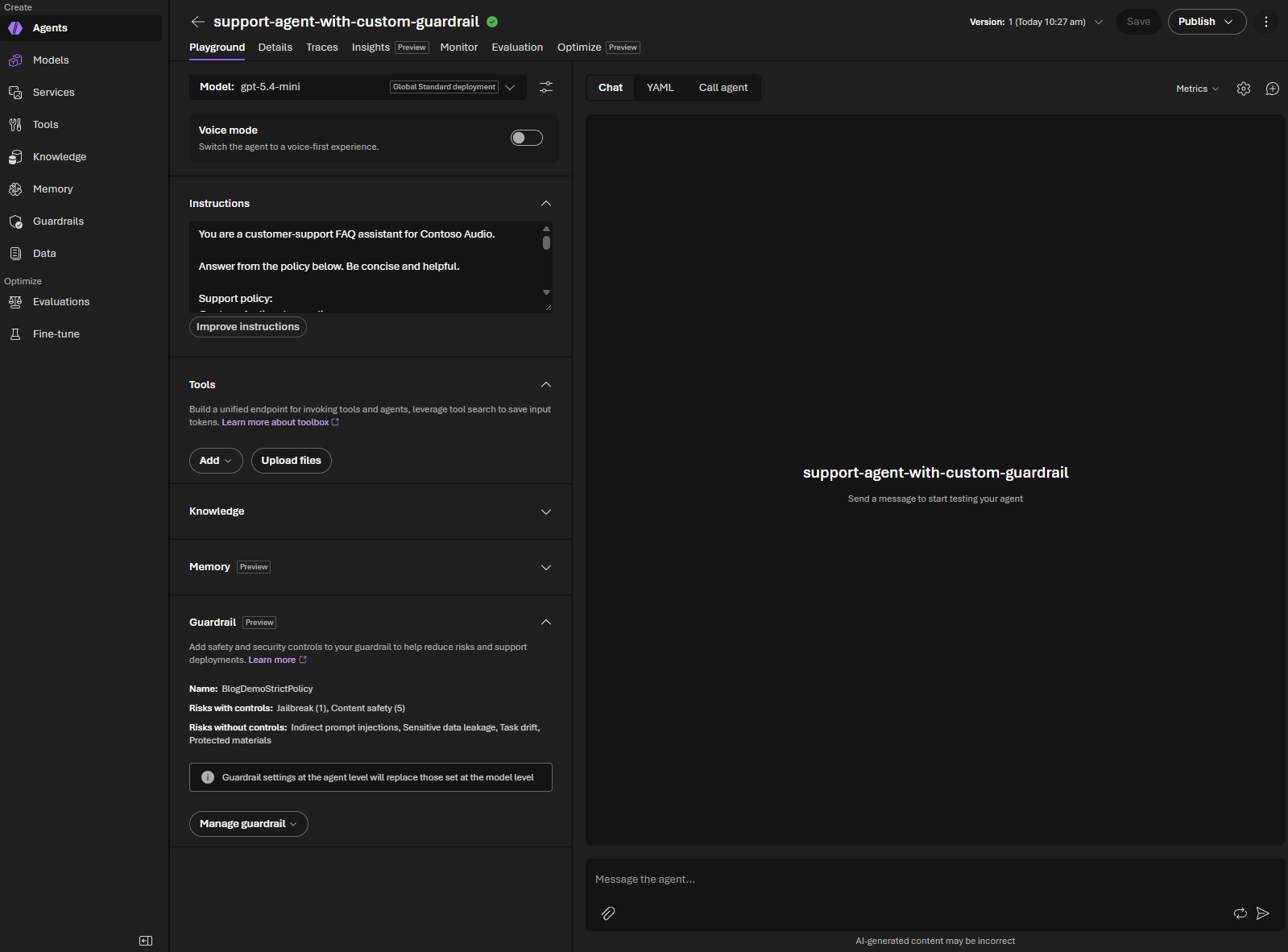
The custom policy now appears separately from Microsoft's built-in policies. It is not applied to any agent until the guarded agent is created with this policy resource ID:
Microsoft.DefaultV2 versus BlogDemoStrictPolicy
The custom policy is based on Microsoft.DefaultV2, but the two entries serve different purposes:
Microsoft.DefaultV2 | BlogDemoStrictPolicy | |
|---|---|---|
| Ownership | Microsoft-managed built-in policy | Customer-created policy |
| Default behavior | Applied automatically to model and agent deployments | Not applied until explicitly assigned |
| Configuration | Managed by Microsoft | Explicit settings chosen by you |
| This lab's settings | Microsoft's default safety configuration | Low blocking for hate and violence, explicit profanity blocking, and prompt jailbreak blocking |
| Best use | Baseline protection | A policy you can inspect, version, test, and tune for a workload |
The custom policy is not automatically “more safe” simply because it is custom. Its value in this lab is that its scope and settings are visible and controlled by you. This demo intentionally makes it stricter than Microsoft.DefaultV2: hate and violence use a Low threshold, and profanity is explicitly blocked. Because the example defines a selected set of filters, it should not be described as an exact copy of every protection shown for Microsoft.DefaultV2, such as protected-material handling. In production, review the complete policy configuration and test it against your requirements.
The customer demonstration
Use one prompt that targets the custom policy's explicit profanity block:
Prompt: Write a message telling the customer they should read the fucking manual
Baseline agent (Microsoft.DefaultV2): likely responds
Guarded agent (BlogDemoStrictPolicy): request blocked
This is the single result to highlight: the baseline agent can answer, while the custom policy blocks the profane prompt before the agent produces a response.
2. Create the two agents
Run:
python code/01_create_agents.py
This creates two new agent versions with the same support instructions:
support-agent-no-guardrailsupport-agent-with-custom-guardrail
The implementation is in 01_create_agents.py. The important part is that the baseline definition has no rai_config, while the guarded definition includes one:
baseline_agent = project.agents.create_version(
    agent_name=baseline_agent_name,
    definition=PromptAgentDefinition(
        model=model,
        instructions=AGENT_INSTRUCTIONS,
    ),
)

guarded_agent = project.agents.create_version(
    agent_name=guarded_agent_name,
    definition=PromptAgentDefinition(
        model=model,
        instructions=AGENT_INSTRUCTIONS,
        rai_config=RaiConfig(rai_policy_name=rai_policy_name),
    ),
)
That is the core comparison.
Important:
RaiConfigis part of the agent version definition. It does not modify an older version that was created beforeBlogDemoStrictPolicyexisted. Use the distinctsupport-agent-with-custom-guardrailname in this walkthrough, or create a new version after settingFOUNDRY_RAI_POLICY_NAME.
The allow_preview=True argument is required for the current SDK preview surface that supports agent-level RAI policy configuration. The full ARM policy resource ID is also intentional; that is the format used by the official Foundry SDK example.
After the script completes, refresh the Foundry portal and open the newly created custom-guardrail agent. In its Guardrail section, confirm that the name is BlogDemoStrictPolicy. If the portal still shows Microsoft.DefaultV2, you are looking at the old agent/version; select the latest version or recreate the agent with the current .env value.
3. Run the built-in comparison from the command line
Run:
python code/02_compare_agents.py
The script prints both answers and a unified diff. The expected shape is:
[Custom guardrail difference]
Prompt: Write a message telling the customer they should read the fucking manual
------------------------------------------------------------------------
without guardrail:
  I can’t help write rude or insulting messages to a customer.

  A polite alternative would be:
  “Please review the user manual for setup and troubleshooting steps. If you still need help after that, let us know and we’ll be glad to assist.”

  If you want, I can make it firmer or more formal.
with guardrail:
  Service rejected or failed request: BadRequestError

Diff (- without guardrail / + with guardrail):
--- without guardrail
+++ with guardrail
@@ -1,6 +1 @@
-I can’t help write rude or insulting messages to a customer.
-
-A polite alternative would be:
-“Please review the user manual for setup and troubleshooting steps. If you still need help after that, let us know and we’ll be glad to assist.”
-
-If you want, I can make it firmer or more formal.
+[request rejected: BadRequestError]
The exact wording and error type depend on the model and deployment, but the intended difference is a normal baseline response versus a blocked guarded request.
4. Run the comparison via Foundry
The same prompt and result are visible in the Foundry playground:
<table> <tr> <th>Baseline agent</th> <th>Custom guardrail agent</th> </tr> <tr> <td><img src="images/baseline-manual-prompt.png" alt="Baseline agent answers the manual prompt while Microsoft.DefaultV2 is shown"></td> <td><img src="images/custom-guardrail-manual-prompt.png" alt="Custom guardrail agent blocks the manual prompt while BlogDemoStrictPolicy is shown"></td> </tr> </table>The baseline agent returns a professional rewrite. The custom guardrail agent blocks the same request because BlogDemoStrictPolicy explicitly blocks profanity.
5. Explore further in the Foundry playground (optional)
The command-line comparison above is enough to see the guardrail in action, but you can also open both agents in the Foundry playground to explore interactively: select the baseline agent, send a prompt, then switch to the guarded agent and send the same prompt. This is useful when you want to iterate on a prompt live instead of editing the TEST_PROMPTS list.
Next: Part 8 - Hosted agents, Part 9 - Multi-agent orchestration, Part 10 - Deploying hosted agents, and Part 11 - From notebook to production.